Running PostgreSQL yourself on a VPS is cheaper than a managed database, and everyone knows it is "more work". How much more is the part nobody writes down. So we did every routine job on a fresh Ubuntu 24.04 box with a stopwatch: install, backups, a point-in-time restore after a bad DELETE, a minor-version restart, and a major upgrade from 17 to 18. Then we listed what has to happen every month to keep it safe, with the release calendar it follows.
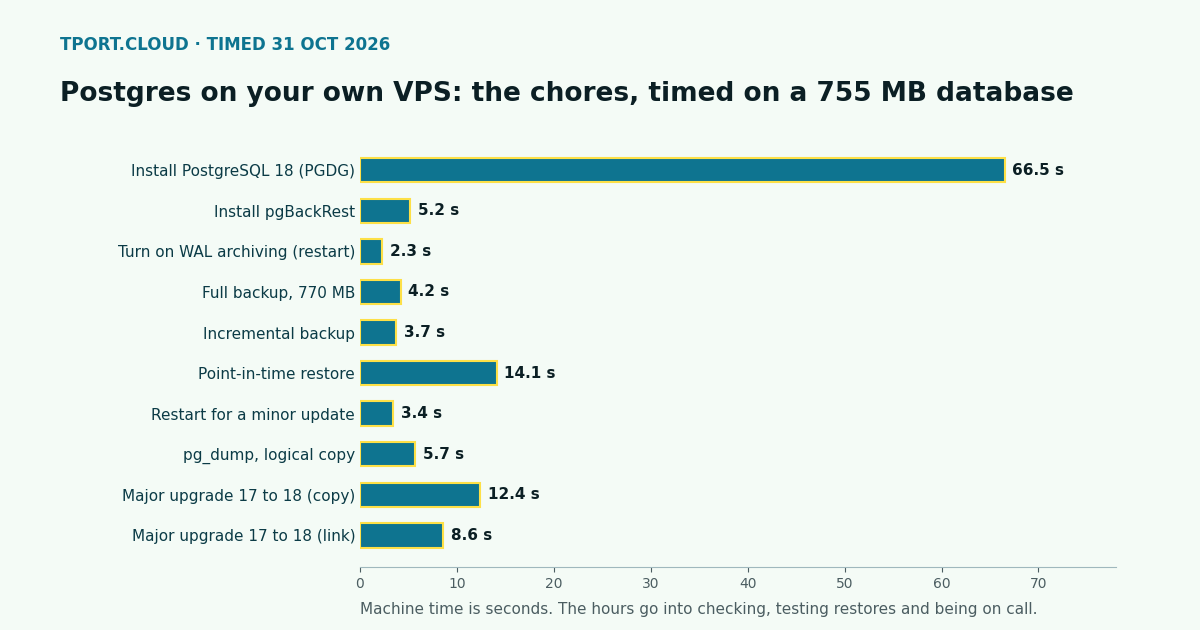
Short version: the commands are fast. On a 755 MB database every chore finished in seconds, the slowest being the install at 66.5 s. The real cost is human: we put it at about 2 to 3 hours a month once it is set up, plus 3 to 5 hours to set it up properly, plus whoever answers when it breaks at night. A managed service sells you those hours.
The calendar you sign up for
PostgreSQL ships a minor release for every supported version at least once a quarter, on the second Thursday of February, May, August and November, with extra releases for urgent security fixes. Each major version gets 5 years of fixes. From the project's roadmap and versioning policy, checked 31 October 2026:
| What | Date | What you do on your own server |
|---|---|---|
| Minor release (all versions) | 12 November 2026 | Read the notes, update packages, restart |
| PostgreSQL 14 end of life | 12 November 2026 | Still on 14? Plan a major upgrade now |
| Minor release | 11 February 2027 | Update, restart |
| Minor release | 13 May 2027 | Update, restart |
| Minor release | 12 August 2027 | Update, restart |
| PostgreSQL 15 end of life | 11 November 2027 | Major upgrade |
| PostgreSQL 18 end of life | 14 November 2030 | Major upgrade |
That is at least four maintenance restarts a year, a major upgrade at least every five years (most teams move every one or two to get new features), and Ubuntu's own security updates every week in between.
What we timed
Setup: Docker container from the official ubuntu:24.04 image, 2 vCPUs, PostgreSQL 18.6 from the PostgreSQL apt repository (PGDG), pgBackRest 2.60 with zstd compression, a pgbench database at scale 50 (5 million rows, 755 MB). The backup repository was a local folder; on a real server it should be object storage or another machine, which only changes a few lines of configuration (below) and adds upload time. The scripts are short shell files, one command per step.
| Step | Wall time | Notes |
|---|---|---|
| Add the PGDG repo and install PostgreSQL 18 | 66.5 s | Mostly download; the cluster starts in 2.2 s |
| Install pgBackRest | 5.2 s | |
| Turn on WAL archiving (needs a restart) | 2.3 s | archive_mode, archive_command |
| Create the backup stanza and check archiving | 0.4 s | |
| Full backup | 4.2 s | 770 MB database, 36.5 MB in the repository (pgbench data compresses unusually well) |
| Incremental backup after 20 s of writes | 3.7 s | 37.4 MB stored |
| Point-in-time restore to just before a DELETE of 2.5 million rows | 14.1 s | Stop, restore with --delta, replay WAL, promote; 5,000,000 rows back |
| Restart (what a minor update costs in downtime) | 3.4 s | Connections drop; apps must reconnect |
| pg_dump of the database | 5.7 s | 15 MB custom-format file |
| Major upgrade 17.11 to 18.6, pg_upgradecluster copy | 12.4 s | Database down for the whole step |
| Major upgrade 17.11 to 18.6, link mode | 8.6 s | Faster, but the old cluster can't be started again afterwards |
| Refresh planner statistics after the upgrade | 2.1 s | vacuumdb --all --analyze-in-stages |
These times grow with the size of the database. Backups and restores scale with data and disk speed; a 50 GB database takes minutes, not seconds, which is why restores need practising before the day you need one. The major upgrade in link mode barely grows with size, because it hard-links data files instead of copying them.
Backups on your own server, step by step
This is the part that decides whether a self-hosted database is safe. With pgBackRest, the minimum that gives you daily backups and point-in-time restore looks like this:
| # | Step | Command or setting | Managed service |
|---|---|---|---|
| 1 | Install pgBackRest | apt install pgbackrest | Done for you |
| 2 | Point it at off-server storage | repo1-type=s3, bucket, endpoint, keys in /etc/pgbackrest.conf | Done for you |
| 3 | Archive every WAL segment | archive_mode = on, archive_command = 'pgbackrest --stanza=main archive-push %p', restart | Done for you |
| 4 | Create and check the stanza | pgbackrest --stanza=main stanza-create, then check | Done for you |
| 5 | Schedule backups | cron or a systemd timer: weekly --type=full, daily --type=incr | Daily, automatic |
| 6 | Keep a set number | repo1-retention-full=2 (or by time) | Fixed window, e.g. 7 days |
| 7 | Alert when a backup or archive fails | Your monitoring reads pgbackrest info or the exit code | Provider watches it |
| 8 | Test a restore | pgbackrest --stanza=main --delta --type=time --target=... restore on a spare box | Restore button; still worth testing |
The configuration we used, with the S3 lines a real server needs:
And the restore we timed at 14.1 s, the one you want to have run at least once before you need it:
The monthly work, task by task
Machine time is small, so the table below is about people: how often each job comes up and the hands-on time we would budget for it on one small production database, once it is set up. These are our estimates from doing the steps above, not survey data; adjust for your own speed and risk.
| Task | How often | Our estimate per month | On a managed service |
|---|---|---|---|
| Ubuntu security updates (unattended-upgrades on, reboots for kernels) | weekly check | 15 to 20 min | Provider |
| PostgreSQL minor update: read notes, update, restart, check apps reconnect | 4 a year + urgent ones | 10 to 15 min | Provider, in a maintenance window |
| Check backups ran and WAL archive keeps up | weekly | 15 to 20 min | Provider |
| Test a restore on a spare server | monthly | 30 to 45 min | Optional (restore button) |
| Disk space, connections, slow queries, bloat | weekly | 30 min | Graphs given; the reading is still yours |
| Major version upgrade, tested with the app first | every 1 to 5 years, 2 to 4 h each | 5 to 20 min | Usually a button or a migration |
| Firewall, TLS certificate, pg_hba.conf, user changes | as needed | 10 min | Provider (you add IPs and users) |
| Total | about 2 to 3 hours | query and schema work only |
Two things are not in that total. Setup: install, TLS, pg_hba.conf, firewall, backups to object storage with encryption, monitoring and alerts, and a first restore test came to 3 to 5 hours for us, done properly. And availability: a standby with automatic failover on your own servers is a project of its own (replication, a consensus store, fencing, failover drills), not an afternoon. If the database must survive losing a server without you waking up, that alone tends to settle the question.
What a managed service does not do
It does not design your schema, add your indexes, fix slow queries, or stop your app from opening too many connections. Those stay with you either way, which is why they are not in the table.
The money, worked out
Take a small app that needs a database with a couple of GB of RAM, and value your time at $50 an hour:
| Option | Server or service / month | Your time / month | At $50/h | Total / month |
|---|---|---|---|---|
| DigitalOcean Droplet, 1 vCPU / 2 GB, Postgres yourself | $12 | 2 to 3 h | $100 to $150 | $112 to $162 |
| DigitalOcean managed PostgreSQL, 1 vCPU / 2 GiB | $30.45 | 0 | $0 | $30.45 |
| tport.cloud server, 4 vCPU / 8 GB, Postgres yourself | $7.50 | 2 to 3 h | $100 to $150 | $107.50 to $157.50 |
| tport.cloud managed PostgreSQL, 6 vCPU / 12 GB | $30 | 0 | $0 | $30 |
On DigitalOcean the managed database costs $18.45 a month more than the matching Droplet: that buys back your 2 to 3 hours if your time is worth more than about $6 to $9 an hour. On tport.cloud the gap is $22.50, so the break-even is about $7.50 to $11 an hour. For almost anyone running a business, managed wins on paper for one production database.
Self-hosting still makes sense when the hours are cheap or already paid for: a side project where a day of downtime is fine, a staging or analytics copy, a team that already runs servers and has the backups and alerts in place, or the database sits on the same server as the app to save a network hop and money. The RAM measurements in our sizing article show PostgreSQL fits next to a small app on 1 GB; on our $7.50 server with 8 GB it has room to cache the whole working set of most small apps.
If you go managed with us
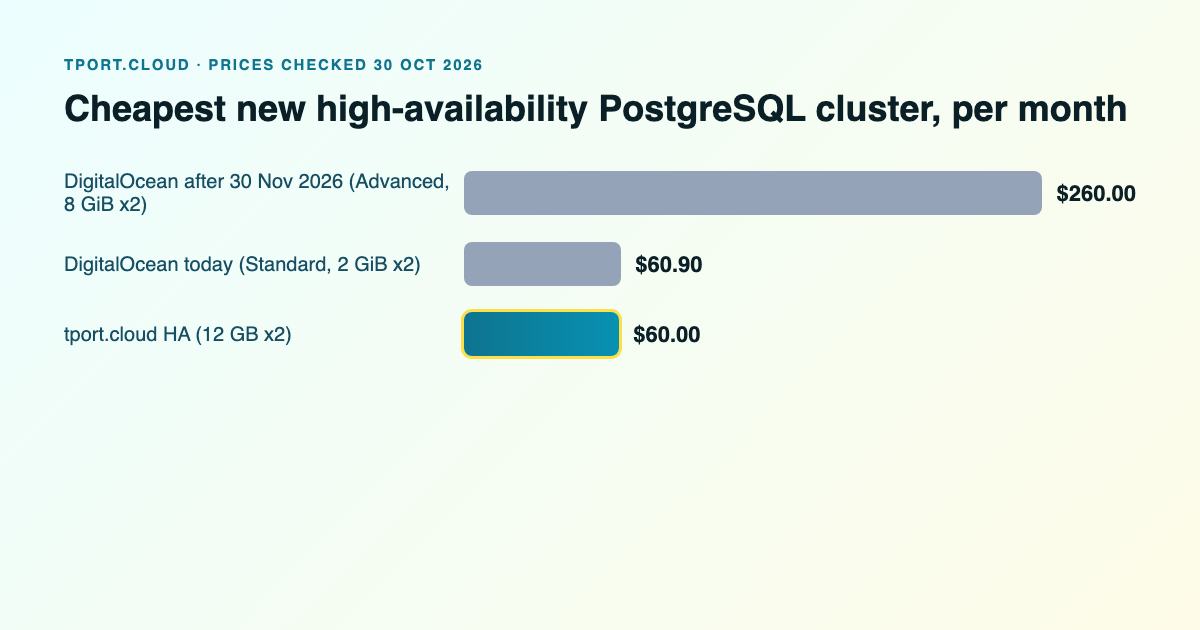
tport.cloud's managed PostgreSQL 18 is $30 a month for a single node with 6 vCPU, 12 GB of RAM and 100 GB of NVMe, or $60 for a primary and a hot standby with automatic failover. Daily backups, 7-day point-in-time restore, PgBouncer on port 6432, TLS required, nothing open to the internet until you add your IPs. Every row of the backup table above is done for you. For how that compares with DigitalOcean's tiers and the standby change coming on 30 November 2026, see Managed PostgreSQL: tport.cloud vs DigitalOcean.
Sources
Our own timings, 31 October 2026: Ubuntu 24.04 container, 2 vCPU, PostgreSQL 18.6 and 17.11 from PGDG, pgBackRest 2.60, pgbench scale 50; the monthly hours are our estimates. PostgreSQL: roadmap (minor release dates), versioning policy, pg_upgrade. pgBackRest user guide. DigitalOcean: managed PostgreSQL features (daily backups, 7-day point-in-time restore, weekly maintenance window), managed database pricing and Droplet pricing, checked 30 October 2026. tport.cloud prices from tport.cloud/pricing, Germany.
PostgreSQL 18 with daily backups and 7-day point-in-time restore, 6 vCPU and 12 GB of RAM for $30 a month.
Managed PostgreSQL