"How much RAM do I need?" is the first question on any server order form, and most answers online are guesses copied from other guesses. So we measured. We ran ten common pieces of a small web app in containers, read their memory while idle, hammered each one for 30 seconds, and read it again. Everything below is from those runs on 31 October 2026, and the method is simple enough to repeat on your own server.
Short version: a typical small app (a Node, Python or Go backend, PostgreSQL and Redis) peaked at 370 to 520 MB in our tests. A default WordPress with MySQL peaked at about 830 MB, most of it MySQL. Add the operating system on top, and 1 GB is enough for the first kind with care, 2 GB is comfortable for either.
How we measured
Each app served one JSON endpoint that builds a list of 200 items per request, so the runtime does real allocation work instead of returning a constant. Each ran in its own Docker container limited to 2 vCPUs. We waited 20 seconds after start and took the median of five samples (idle), ran hey for 30 seconds with 50 concurrent connections while sampling every half second (peak), then waited 30 seconds and sampled again (idle after load). WordPress was a fresh 7.1.4 install serving its home page to 20 connections; PostgreSQL ran pgbench with 20 clients on a scale-10 database (about 150 MB); Redis ran redis-benchmark with 300,000 SET/GET of 256-byte values.
"Memory" here is what docker stats shows: the container's memory use minus inactive file cache. We also kept the anonymous memory (heap and stack, the part the kernel can't simply drop), which matters for PostgreSQL below. Host: Docker Desktop on a 6-core machine, Linux kernel 5.15. Versions: Node 22.23 + Express 4, Python 3.12 with FastAPI 0.115 / Uvicorn 0.32 and Django 5.1 / Gunicorn 23, PHP 8.3.36 with Apache (prefork, image defaults), Go 1.23, PostgreSQL 18, MySQL 8.4.13, Redis 7.4.12.
The results
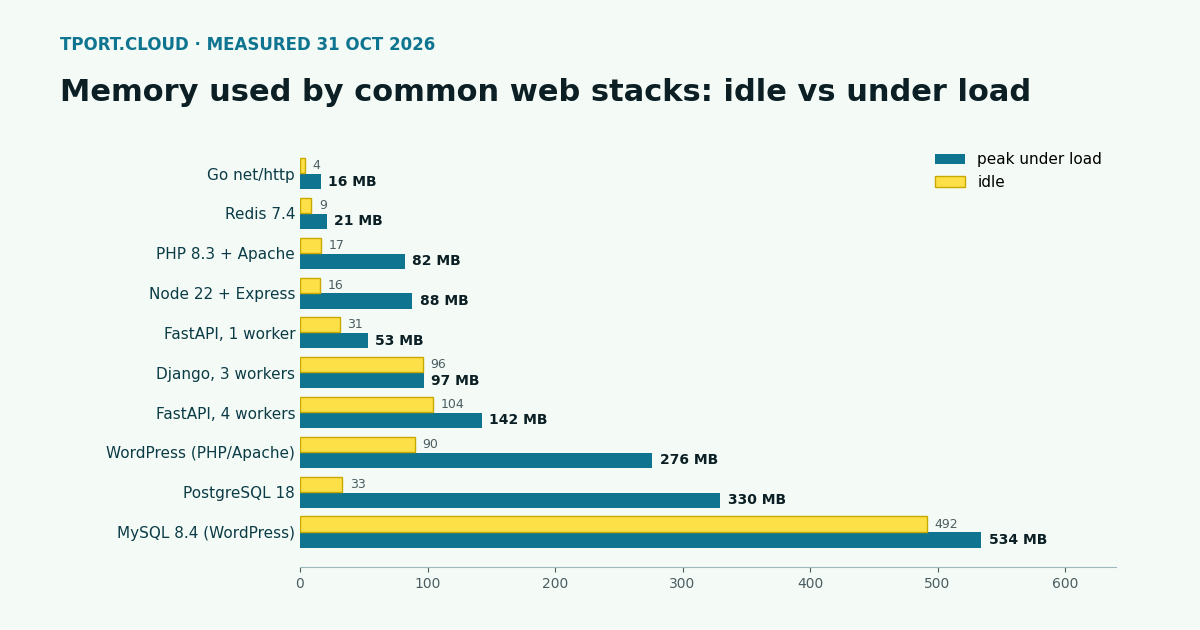
| Stack | Idle | Peak under load | Idle after load | Throughput in our run |
|---|---|---|---|---|
| Go, net/http | 4 MB | 16 MB | 16 MB | 7,062 req/s |
| Redis 7.4 | 9 MB | 21 MB | 10 MB | 171,135 GET/s |
| PHP 8.3 + Apache (mod_php) | 17 MB | 82 MB | 47 MB | 4,115 req/s |
| Node 22 + Express | 16 MB | 88 MB | 22 MB | 4,395 req/s |
| FastAPI, 1 Uvicorn worker | 31 MB | 53 MB | 53 MB | 301 req/s |
| Django, 3 Gunicorn workers | 96 MB | 97 MB | 97 MB | 2,606 req/s |
| FastAPI, 4 Gunicorn/Uvicorn workers | 104 MB | 142 MB | 142 MB | 553 req/s |
| WordPress 7.1 (PHP 8.3 + Apache) | 90 MB | 276 MB | 167 MB | 23 req/s (home page) |
| PostgreSQL 18, defaults | 33 MB | 330 MB | 299 MB | 3,902 TPS (pgbench) |
| MySQL 8.4, defaults, empty | 434 MB | n/a | n/a | n/a |
| MySQL 8.4 behind WordPress | 492 MB | 534 MB | 533 MB | n/a |
The throughput column is only there to show each stack was actually busy. It is not a benchmark: the load generator shared the machine and the endpoint is tiny. FastAPI's number is low because the handler is a plain def, which Uvicorn runs in a thread pool. Memory is what we are after here.
What the numbers say
Your app is usually the small part
Every app runtime in the test stayed under 150 MB at peak, and most under 100 MB. Go barely registers. Node and PHP jump under load and give memory back afterwards (Node went from 88 back to 22 MB; Apache kept some spare children at 47 MB). Python holds on to what it has grown to: FastAPI stayed at 53 MB after the load, the 4-worker setup at 142 MB.
Python cost grows per worker
Gunicorn starts one full Python process per worker. Django with 3 workers sat at 96 MB, about 32 MB each. FastAPI went from 31 MB with one worker to 104 MB with four, about 24 MB for each extra worker. The common advice of 2 x cores + 1 workers means 9 workers on a 4 vCPU server: roughly 220 to 290 MB for a simple app, more for one with heavy imports. Count workers before you count RAM.
The database is the big part, and its number needs reading
PostgreSQL showed 330 MB at peak, but only 35 MB of that was anonymous memory. The rest is its shared buffers (128 MB by default) and the kernel's cache of the database files it was reading. That cache is useful but elastic: on a small server the kernel shrinks it when apps need memory, and the database gets slower instead of crashing. So PostgreSQL fits in less RAM than the headline number suggests, as long as you leave some room for that cache.
MySQL 8.4 is different: 428 MB of its 434 MB idle was anonymous memory, before a single table existed. Two defaults account for most of it, the 128 MB InnoDB buffer pool and the Performance Schema. Restarting the same image with --performance-schema=OFF --innodb-buffer-pool-size=64M brought idle memory down to 195 MB. On a 1 GB server that one change is the difference between WordPress fitting and not.
WordPress grows with concurrency
Apache with mod_php runs a process per concurrent request. At 20 simultaneous visitors WordPress reached 276 MB, three times its idle size: about 9 MB per extra busy worker. With the Apache default of up to 150 workers, a burst of traffic on a small server can start more processes than RAM allows. Set MaxRequestWorkers to what fits; at the rate we saw, 30 workers comes to roughly 370 MB.
The operating system
A minimal Ubuntu 24.04 userland with systemd, journald, resolved, logind, rsyslog, cron and unattended-upgrades used 24 MB in our test container; the biggest single process was unattended-upgrades at 20 MB resident. A container shares the host's kernel, so that figure leaves out the kernel and its buffers, which a real server pays for. Canonical's own minimum for Ubuntu 24.04 cloud images is 1 GB of RAM (1.5 GB for the ISO installer). The totals below use our 24 MB; on a real server leave a couple of hundred MB more for the kernel, caches and the occasional apt upgrade.
Putting stacks together
Adding the peaks plus the 24 MB of system services gives the working set of a whole server. Peaks rarely all happen at once, so this is the cautious figure:
| Server | Pieces (peak, MB) | Total at peak | Fits in |
|---|---|---|---|
| Go API + PostgreSQL | 16 + 330 + 24 | 370 MB | 1 GB; 512 MB only with PostgreSQL tuned down |
| Node + PostgreSQL + Redis | 88 + 330 + 21 + 24 | 463 MB | 1 GB |
| Django (3 workers) + PostgreSQL + Redis | 97 + 330 + 21 + 24 | 472 MB | 1 GB |
| FastAPI (4 workers) + PostgreSQL + Redis | 142 + 330 + 21 + 24 | 517 MB | 1 GB, tight; 2 GB comfortable |
| WordPress + MySQL, defaults | 276 + 534 + 24 | 834 MB | 2 GB |
| WordPress + MySQL, Performance Schema off, 64 MB pool | 276 + about 237 + 24 | about 537 MB | 1 GB |
For the tuned WordPress row we added MySQL's growth under load from the default run (42 MB) to the tuned 195 MB idle figure; we did not load-test the tuned setup separately. Leave room on top of every total for deploys and package installs, which run alongside everything else, and for your data growing.
Our sizing rules from these runs
| RAM | Good for |
|---|---|
| 512 MB | One small app with SQLite or a database elsewhere; a Go or Node service; a test box. Add swap. |
| 1 GB | A small app with PostgreSQL and Redis on the same server, or WordPress with MySQL tuned down. |
| 2 GB | Default WordPress + MySQL, a Python app with several workers and a database, or two small apps. |
| 4 GB and up | Several apps, a database whose working set is a few GB, background workers, builds on the server. |
Measure your own server in two minutes
The numbers that matter are yours. On any Linux server:
Then put load on it the way we did and watch free -m from a second terminal:
If available drops under about 10% of RAM at peak, you need more memory or fewer workers. On small servers a swap file is cheap insurance against a crash during an unusual spike (it is not a substitute for RAM):
Where this lands on tport.cloud
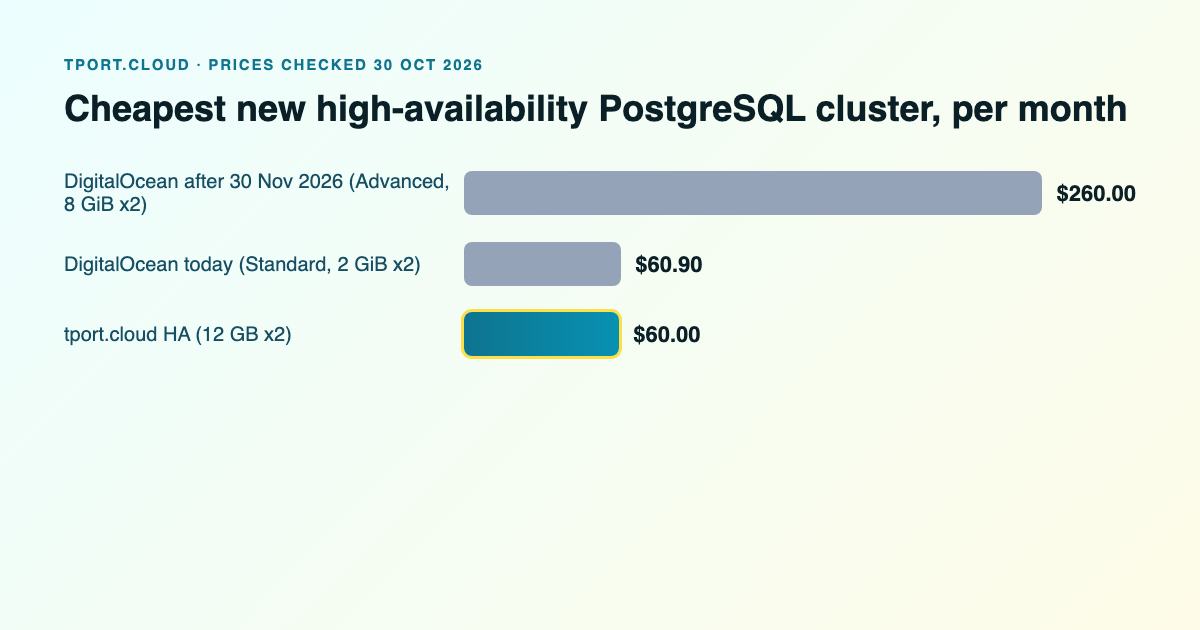
Our smallest server is $1 a month for 0.5 vCPU, 512 MB and 10 GB, free for 30 days: enough for a Go or Node service or a test box. Shared servers start at $2 a month for 1 GB. The first standard server is $7.50 a month for 4 vCPU and 8 GB, which holds every combination in the table above several times over, with a database cache that never has to fight your app for room. If you would rather keep the database off the box, managed PostgreSQL is $30 a month for 12 GB (how it compares with DigitalOcean's). For what the same RAM costs elsewhere, see tport.cloud vs DigitalOcean Droplets.
Sources
Our own measurements, 31 October 2026 (Docker, 2 vCPU per container, hey 30 s / 50 connections, pgbench and redis-benchmark as described). Ubuntu: Ubuntu Server system requirements. Load tool: hey. Defaults referred to: PostgreSQL shared_buffers 128 MB, MySQL innodb_buffer_pool_size 128 MB, Apache prefork MaxRequestWorkers 150. tport.cloud prices from tport.cloud/pricing, Germany, 31 October 2026.
Start with the $1 server, free for 30 days, or take 8 GB for $7.50 a month. Traffic included, prepaid, no surprise bills.
See all servers