From a clean Ubuntu 24.04 server to a real Let's Encrypt certificate takes about a minute of machine time: our first certificate took 13.1 seconds to issue and install, and a renewal test took 10.4. The steps are short. What goes wrong is everything around them: an HTTP/2 line that fails on Ubuntu's nginx, websockets that drop after 60 seconds, and a renewal that only breaks months later.
We ran this on 3 November 2026 on clean Ubuntu 24.04 servers (2 vCPU, 4 GB) with nginx 1.24 and certbot 2.9. The certificate was real, from Let's Encrypt production, on a throwaway name. You need a domain with an A record pointing at your server, and ports 80 and 443 open.
What it costs
| Measure | Result |
|---|---|
| Install time, nginx then certbot | 11 s and 13 s |
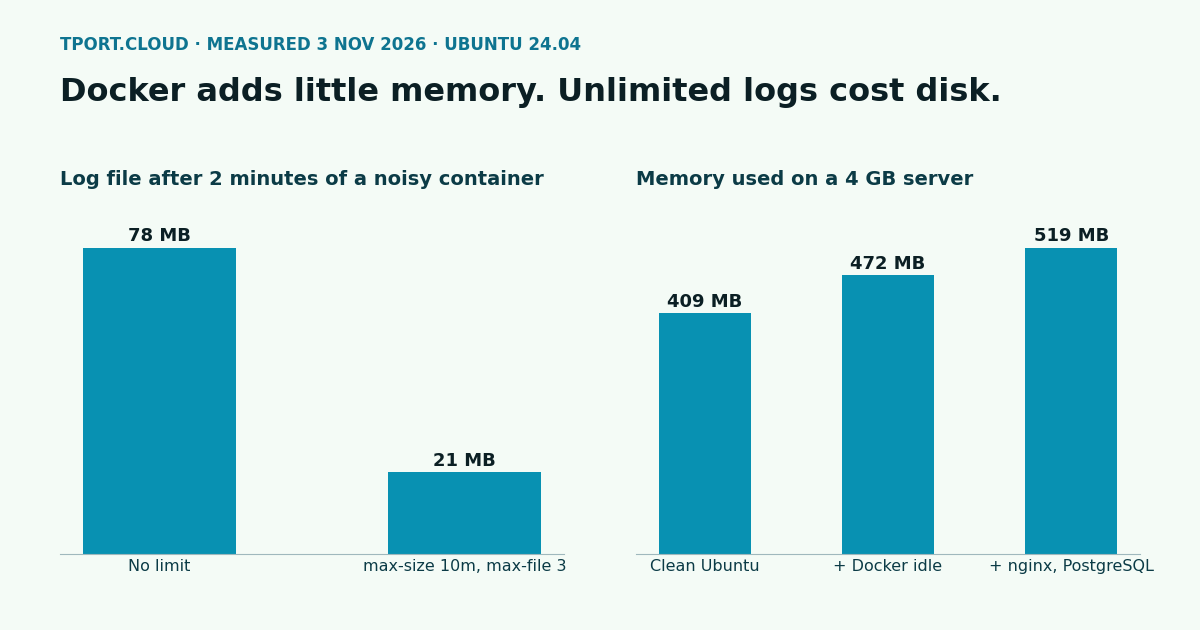
| nginx memory | About 7 MB for the master process and 4.5 MB per worker (2 workers on 2 vCPU) |
| Disk for nginx | 2 MB |
| Disk for certbot and its nginx plugin | 11 MB, as Ubuntu already has the Python it needs |
| Issue and install the first certificate | 13.1 s |
certbot renew --dry-run | 10.4 and 10.5 s |
Step 1: install nginx and open the firewall
New to this server? Do SSH, ufw and fail2ban first. Have your app listen on 127.0.0.1 so that nginx is the only way in. If it's in Docker, publish it on localhost, because Docker's published ports skip ufw.
Step 2: proxy your app
Start with plain HTTP, because certbot needs it to prove you own the name. This goes in /etc/nginx/sites-available/app, with your own name and app port:
Those proxy_set_header lines do real work. Our test app printed the headers it got, so you can see what it would use for client addresses and for building links:
Without Host your app sees the upstream's name, without X-Forwarded-For every visitor looks like 127.0.0.1, and without X-Forwarded-Proto an app can build http:// links and loop on redirects. Only trust these headers from your proxy.
Step 3: get the certificate
Add more names with extra -d options. This asked Let's Encrypt for a certificate, answered the challenge over port 80, edited the site file, and reloaded nginx. Ours got an ECDSA certificate valid for 90 days. --redirect adds the HTTP to HTTPS redirect. Check all of it:
Step 4: HTTP/2 and headers, and the line that fails
Most guides written now tell you to add http2 on;. Ubuntu 24.04 ships nginx 1.24, and that directive only arrived in 1.25.1:
On this version, put it on the listen line. Add the headers in the same block:
Only add Strict-Transport-Security once HTTPS works, as browsers then refuse plain HTTP for your name for a year. Also, add_header in a location block replaces the ones from the server block, so a block with its own add_header loses these.
Step 5: websockets
The Upgrade and Connection lines from step 2 are what make websockets work. We tested a small echo server through nginx:
| Setup | Result |
|---|---|
| No upgrade headers | Rejected: the app answered with a normal HTTP 200 |
| Upgrade headers, 20 s idle | Works |
| Upgrade headers, 75 s idle | Connection closed, because proxy_read_timeout defaults to 60 s |
Upgrade headers plus proxy_read_timeout 1h, 75 s idle | Works |
Over wss:// | Works |
So a quiet connection dies at 60 seconds, even though it worked in your first test. Either send a ping from the app more often than that, or give the websocket path a longer timeout. Don't raise it for the whole site:
Step 6: test the renewal, then break it
Certificates last 90 days and certbot renews them by itself. The package installs a timer that runs twice a day with a random delay of up to 12 hours, and renews once a certificate is close to expiry.
Two runs took 10.4 and 10.5 seconds against Let's Encrypt's test service. They used the same checks a real renewal would, so most failures show up here, not at day 90. To see one, we closed port 80 on the server's firewall and ran it again:
It's the most common way to lose a certificate: someone tidies the firewall to "HTTPS only" and nothing breaks until the renewal, long after they've forgotten. Keep port 80 open. The exact wording you get depends on what's in the way, and ours went through a test proxy. With port 80 open again, the next dry run passed.
If you run a dry run from a script or cron rather than a terminal, certbot first waits a random time of up to several minutes, and ours looked hung. Add --no-random-sleep-on-renew when you test that way, not in the regular timer. Let's Encrypt also limits how many certificates you can get for the same names each week, so test with --dry-run, not by reissuing.
What it does to speed
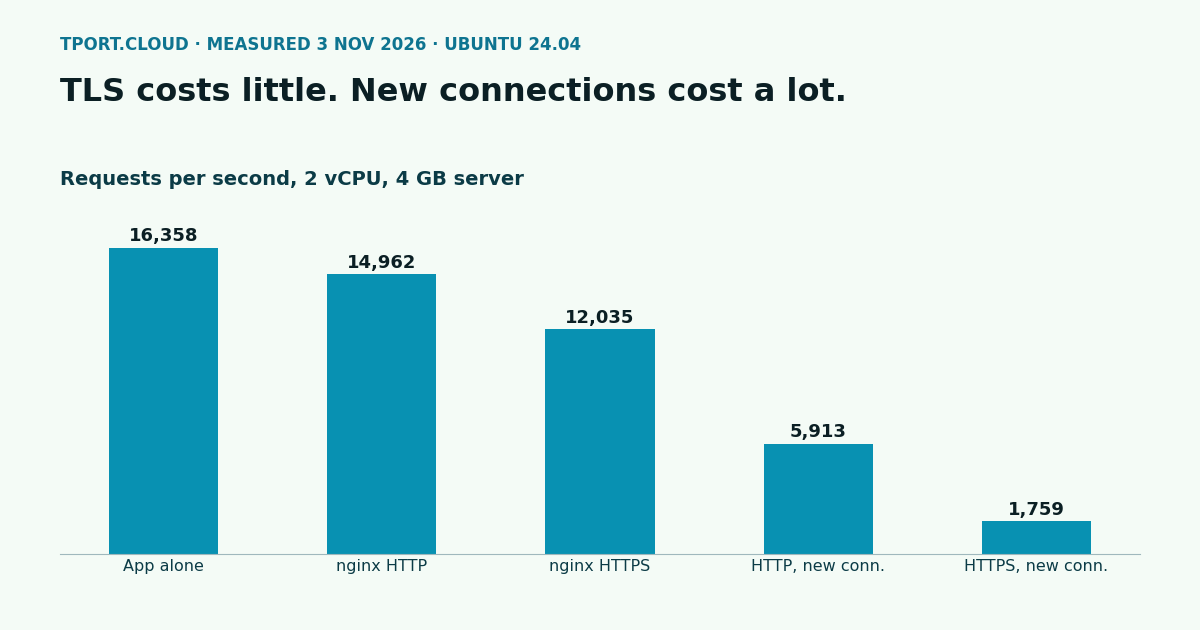
A small Node app, with 50 connections for 30 seconds, from another machine, 3 runs each on a 2 vCPU, 4 GB server. The certificate was the same type as the real one, P-256 ECDSA, with TLS 1.3.
| Path | Requests per second, median | Range | p95, median run |
|---|---|---|---|
| App directly, kept connections | 16,358 | 7,932 to 16,629 | 9 ms |
| nginx, HTTP, kept connections | 14,962 | 14,211 to 15,354 | 9 ms |
| nginx, HTTPS, kept connections | 12,035 | 10,468 to 13,137 | 12 ms |
| nginx, HTTP, a new connection each request | 5,913 | 3,916 to 6,017 | 19 ms |
| nginx, HTTPS, a new connection each request | 1,759 | 1,120 to 1,771 | 51 ms |
One low outlier on the first row and some spread elsewhere come from load on our shared test machine, so read these as sizes. nginx took about 9% off, and TLS about 20% more with kept connections. That's small, as real apps spend far more time on their own work. The big cost is the TLS handshake, 70% fewer requests a second than plain HTTP when each one is a new connection. Browsers reuse connections, but if your API clients open one per call, this is the first thing to fix.
Which of our servers can run this
| Server | Fit |
|---|---|
| $20 a month and up | All of it. Picking Nginx in the installs gets you the default site off and ports 80 and 443 open |
| Under $20 | Everything installs and runs, and these sizes have plenty of room. Over IPv4 only your SSH port is reachable from outside for now, so Let's Encrypt can't reach port 80 and a public site won't work. Use one for a private service behind a tunnel, or take a server from $20 |
Want more than one app? Add more server blocks, one name each, and run certbot for each name.
Sources
Our own runs on Ubuntu 24.04, 3 November 2026: nginx 1.24.0, certbot 2.9.0, Node 18.19, load from hey; certificate from Let's Encrypt production, on a throwaway name, since removed. Load tests under QEMU/KVM with kernel 6.8.0-147. Docs: nginx HTTP/2 module (http2 appeared in 1.25.1), nginx websocket proxying, certbot user guide, Let's Encrypt rate limits.
Pick Nginx in the installs when you order, and the default site is off with ports 80 and 443 open.
See the servers