A fresh Docker install on Ubuntu has two defaults that catch people out. A published port goes straight past ufw, so a firewall that says "deny" still lets the world reach your container. And container logs have no size limit, so a chatty app slowly fills the disk.
This guide installs Docker Engine and Compose from Docker's own repository, then fixes both. We ran every command below in this order on a clean Ubuntu 24.04.5 server (2 vCPU, 4 GB, kernel 6.8) on 3 November 2026, with a second server acting as the outside world. That gave Docker 29.9.2 and Compose v5.7.0. Yours may be newer.
What it costs
| Measure | Result |
|---|---|
| Install time for the Docker packages | 43 s |
| Disk used by the Docker packages | 470 MB |
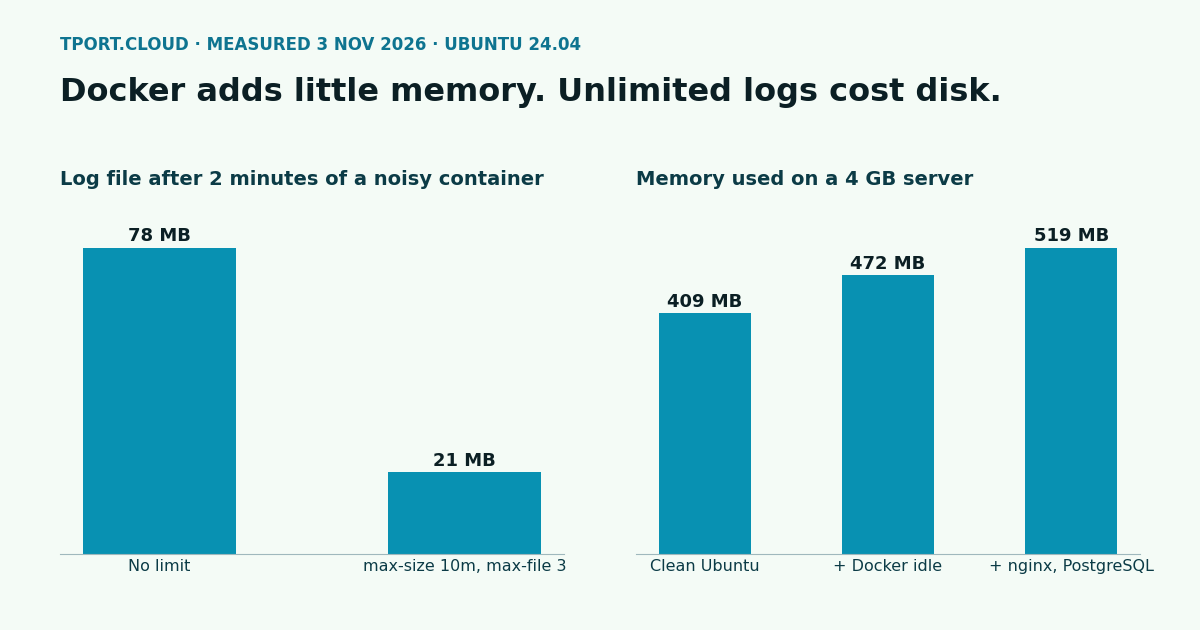
| Memory used, clean Ubuntu | 409 MB |
| Memory used, Docker running, no containers | 472 MB (63 MB more) |
| Memory used, plus nginx and PostgreSQL 18 in Compose | 519 MB |
Container memory per docker stats | nginx 3.8 MiB, PostgreSQL 25.7 MiB, both idle |
| Disk after pulling those images and starting them | 2,893 MB used in all, 1,236 MB more than a clean server |
Memory is MemTotal minus MemAvailable. Install time depends on your connection to Docker's servers, so treat 43 seconds as a rough size. If you're choosing a server, Docker itself is a rounding error: what you run inside it decides, and we measured common stacks here.
Step 1: install from Docker's repository
Ubuntu's own docker.io package isn't the one Docker publishes and maintains, so use Docker's repository. Run these as root, or put sudo in front:
Check that it works:
To run Docker without sudo you'd add a user to the docker group, but that group is root on the server in all but name: anyone in it can mount / into a container. Keep it to accounts you'd give root.
Step 2: see the ufw gap for yourself
Turn on ufw with only SSH allowed, then publish a container port:
From another machine, we got this:
| Port | ufw status says | curl from outside |
|---|---|---|
8080, published with -p 8080:80 | Not listed, so denied | 200, open to the world |
8081, published with -p 127.0.0.1:8081:80 | Not listed, so denied | No connection |
| 9999, nothing listening | Not listed, so denied | No connection |
The reason is the order of the firewall chains. Docker sends published ports through its own NAT rules, so the traffic is forwarded to the container and never reaches ufw's input rules. You can see the rule that opened it:
Step 3: close the gap
There are two fixes, and you can use both.
Publish on localhost when a proxy sits in front
If nginx or Caddy on the host handles public traffic, nothing else needs a public port. Write 127.0.0.1:8080:80 instead of 8080:80, and the container is only reachable from the server itself. This is the simplest fix and it covers most setups. Here's the proxy side of that setup.
Make ufw decide for every published port
Docker leaves one chain for you, DOCKER-USER, which it checks before its own rules. Send traffic from your public network interface through ufw's rules there, and drop whatever they don't allow. Find your interface first:
Add this to the end of /etc/ufw/after.rules, replacing eth0 with your interface:
Now open a port on purpose with ufw route allow. Use the port inside the container, not the published one, because by the time this chain runs the address has already been translated. For -p 8080:80 that's port 80:
What we measured from outside at each stage, including after a reboot to prove it lasts:
| Stage | 8080 (published) | 8081 (localhost only) |
|---|---|---|
| Before the fix | 200 | No connection |
After the DOCKER-USER rules | No connection | No connection |
After ufw route allow on port 80 | 200 | No connection |
| Route rule deleted, server rebooted | No connection | No connection |
This test was over IPv4. If you turn on IPv6 for Docker, repeat it against your IPv6 address. Keep a second SSH session open while you edit firewall rules, and if you haven't locked down the rest of the server yet, start with hardening SSH, ufw and fail2ban.
Step 4: cap the container logs
By default Docker uses the json-file log driver with no limit on size. To see what that means we ran a container writing about 0.65 MB of logs a second for 2 minutes, once with the defaults and once with a limit:
| Setup | Log files after 120 s | At this rate, per day |
|---|---|---|
| Default, no limit | 78 MB in one file | About 56 GB, so a 30 GB disk is full in under 13 hours |
max-size 10m, max-file 3 | 21 MB in three files (about 2 + 10 + 10 MB) | Never more than 30 MB |
That rate is deliberately harsh, to get a result in minutes. A more normal 1 KB a second is 86 MB a day, which fills the same disk in about a year, long after you've forgotten about it. Set the limit for the whole server in /etc/docker/daemon.json:
This only applies to containers created after the change. We checked: the container that already existed still showed {json-file map[]}, no limit, after restarting Docker. Recreate old ones:
A limit also means old logs are gone, past 30 MB per container here. If you need history, ship logs elsewhere or raise the numbers. Restarting Docker also stops running containers unless live-restore is on, so do this before you have traffic.
Step 5: run something with Compose
A small project with a web server on localhost only and a database with no published port at all. Note the volume path: the PostgreSQL 18 images keep data under /var/lib/postgresql, not the /var/lib/postgresql/data you'll see in older examples. With images to download, docker compose up -d --wait took 55 seconds on our server.
Services in the same Compose project find each other by name, so an app added to this file reaches the database at db:5432 without any port published. From outside, port 8080 gave no connection, as it should.
Which of our servers can run this
| Server | Docker | Notes from our test |
|---|---|---|
| $20 a month and up | Yes, every step | Your own kernel, so everything above applies |
| Under $20, Docker picked in the order's installs | Yes | hello-world ran on a 2 vCPU, 4 GB server and ufw works. Over IPv4 only your SSH port is reachable from outside for now, so these fit private jobs better than public sites |
| Under $20, Docker not picked | No | It installs, but docker run fails with a runc create failed error |
The stack above used about 110 MB on top of a clean server, so memory isn't what limits you on any of these. Our test of swap on small servers covers what happens when a build or a spike goes over.
Sources
Our own run on Ubuntu 24.04.5, kernel 6.8.0-147, QEMU/KVM, 3 November 2026; limits checked on a real small server the same day. Install Docker Engine on Ubuntu, Docker with ufw, JSON File logging driver, ufw manual.
Want this done for you? Pick Docker in the installs when you order a server and it comes with Compose ready to go.
See the servers