On a clean Ubuntu 24.04 server, security updates already install themselves. What's off by default is the reboot, so a patched kernel or C library can sit on disk unused for months. And nothing tells you any of this happened.
This guide checks what's on, sets a reboot window, adds a notice to your phone or chat, and shows how long a reboot actually takes you offline. We ran it on clean Ubuntu 24.04.5 servers (2 vCPU, 4 GB) on 3 November 2026, with another machine sending a request every 0.1 seconds. In 5 timed reboots, nginx was back in 5 to 19 seconds and a Node app with PostgreSQL in 8 to 22, depending on the server type.
Step 1: see what's already on
On our clean server that was Update-Package-Lists "1" and Unattended-Upgrade "1", all three units enabled, and 18 packages waiting because the image was a few weeks old. So you usually don't install anything. Here's what the stock config does and doesn't do:
| Setting | Ubuntu default | What it means |
|---|---|---|
| Sources allowed | noble, noble-security, plus the two Ubuntu Pro ESM sources | Security fixes only: 10 of our 18 waiting packages qualified |
| Install time | 06:00 plus a random delay of up to 60 minutes | Could be your busy hour |
Automatic-Reboot | Off | Kernel and C library fixes don't take effect until someone reboots |
| Notice | Log file only | /var/log/unattended-upgrades/ |
| Old kernels removed | Line commented out in the file | Set it on purpose so /boot doesn't fill |
Step 2: set your own window
Don't edit 50unattended-upgrades, because package updates may prompt about it. Put your settings in a later file. This installs at 02:30 and reboots at 03:30, only if a reboot is needed. Times are in the server's time zone, which is UTC unless you changed it.
The empty OnCalendar= matters: without it systemd adds your time to the default instead of replacing it. If you run more than one server behind a load balancer, give each a different hour so they don't all go down together.
Step 3: a notice that reaches you
Unattended-Upgrade::Mail works if the server can send mail, which a new one usually can't. A webhook is simpler and works with Slack, Discord, ntfy or your own endpoint. Hook it to the service so it runs after every daily run:
The - in front of the path means a failed notice won't mark the update run as failed. Check it for real, not with a dry run. Our receiver got this after the run below:
| Run | Own-kernel server | Server under $20 |
|---|---|---|
unattended-upgrade --dry-run | 26 s | Not timed |
| Real run through the service, first time | 39 s, 10 packages | 38 to 42 s |
Two things that bit us
systemctl start can return early. Ours printed Warning! D-Bus connection terminated and came back while the upgrade was still running, because the update restarted D-Bus. Check that the service has gone inactive before you trust the result.
Your deploy script can hit the lock. While that was running, our next command failed with E: Could not get lock /var/lib/dpkg/lock-frontend. It is held by process 1862 (unattended-upgr). If a script installs packages near your update window, make it wait:
Step 4: check what still needs a restart
Installing a fixed library doesn't help a process that still has the old one in memory. needrestart tells you which ones. It's on Ubuntu's server images already; add it if it's missing.
In our run the kernel didn't change, so no reboot was flagged, yet four services were still on old libraries. That's the gap the reboot window closes when a reboot is flagged, and the reason for a weekly look at this list.
Step 5: make sure your apps come back
A reboot is only cheap if everything restarts by itself. For systemd, that means an [Install] section and enable; for Docker, a restart policy. Order your app after its database, or its first requests will fail:
How long you're down
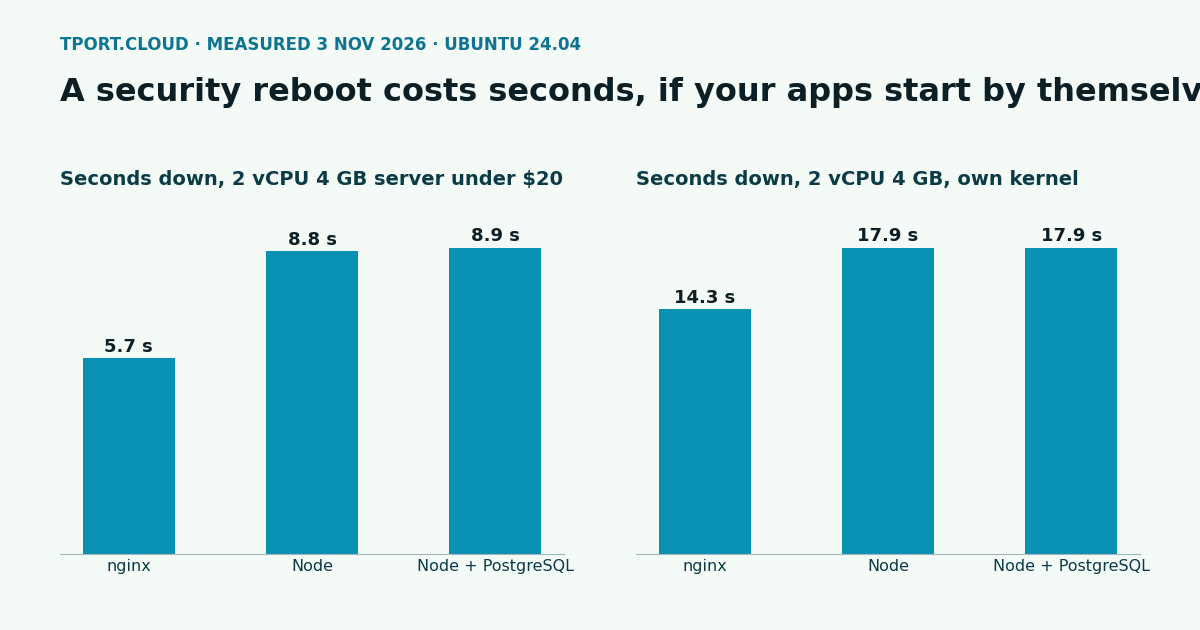
We ran nginx on port 80, a Node 18 app on port 3000, and the same app answering select 1 from PostgreSQL. Downtime here runs from the first failed request to the first 200. Each server was rebooted 5 times with systemctl reboot. These were small apps with nothing to warm up, so add your own start time.
| Stack | Server under $20: median (range) | Own-kernel server: median (range) |
|---|---|---|
| nginx | 5.7 s (4.9 to 8.5) | 14.3 s (13.8 to 18.7) |
| Node | 8.8 s (7.9 to 11.7) | 17.9 s (17.1 to 22.1) |
| Node + PostgreSQL | 8.9 s (8.2 to 11.7) | 17.9 s (17.1 to 22.1) |
Node came back about 3 seconds after nginx on both because it waited for PostgreSQL, which systemd-analyze blame put at 2.8 seconds and the slowest unit of the boot. The database itself added no further wait for select 1. The own-kernel figures come from a virtual machine in our lab, and real servers with slower firmware or disks can take longer, so time your own once before you choose a window.
Prove the automatic reboot works
Don't wait for a kernel update to find out. This fakes the flag and sets the time to now. It will reboot the server.
That reboot gave the same downtime as the others: 6.1 seconds for nginx and 10.1 for Node on a server under $20.
What our smaller servers can't do
| Step | $20 a month and up | Under $20 |
|---|---|---|
| Security updates, windows, notices | Yes | Yes, tested on 2 vCPU, 4 GB |
| Automatic reboot | Yes | Yes, tested |
| Kernel updates | Yes, yours to install and reboot for | Not applicable: no kernel package is installed, and we look after the kernel |
needrestart | Preinstalled | Not preinstalled, add it |
Next on a new server: lock down SSH, ufw and fail2ban, and if you run containers, see Docker's firewall and log settings.
Sources
Our own runs on Ubuntu 24.04.5, 3 November 2026: unattended-upgrades 2.9.1, needrestart 3.6, nginx 1.24, Node 18.19, PostgreSQL 16.15; one server type under QEMU/KVM with kernel 6.8.0-147, one on a real server under $20 with the same 2 vCPU and 4 GB. Docs: Ubuntu Server, automatic updates, Debian wiki, UnattendedUpgrades, needrestart.
Pick a region and a budget and see your best servers, all on Ubuntu 24.04 with security updates ready to go.
See the servers