A backup you haven't restored is only a hope, so we did what a bad day looks like: we shut the server down, built a new one with nothing on it but restic, two small files and network access to the store, and had 3.44 GiB and 86,641 files back in 41 seconds. Every SHA-256 checksum matched. This guide gives you the same setup: encrypted backups to S3-compatible storage, on a daily timer, with old backups pruned and an alert when a run fails.
We ran every step on 3 November 2026, on a clean Ubuntu 24.04 server with 2 vCPU and 4 GB of memory, using restic 0.16.4 from Ubuntu's own packages. One thing to keep in mind when reading the times: our test store was on a local network at 1.27 Gbit/s. Yours is probably further away, and we work out what that means below.
Step 1: install and get your storage details
Create a bucket and an access key with your storage provider. Any S3-compatible store should work the same way, as the only part that changes is the address.
That took 14 seconds. Put the settings in one private file:
Copy both files somewhere that isn't this server, now. Our new-server restore needed nothing else. If you lose the password, restic can't get your data back, and neither can anyone else.
Step 2: first backup
Point it at your own folders. Our test data was the Linux 6.12 source (1.6 GB, lots of small files), a 1 GB SQL dump and 1 GB of random data that can't be compressed, standing in for photos.
| What we ran | Time | Peak memory | Result |
|---|---|---|---|
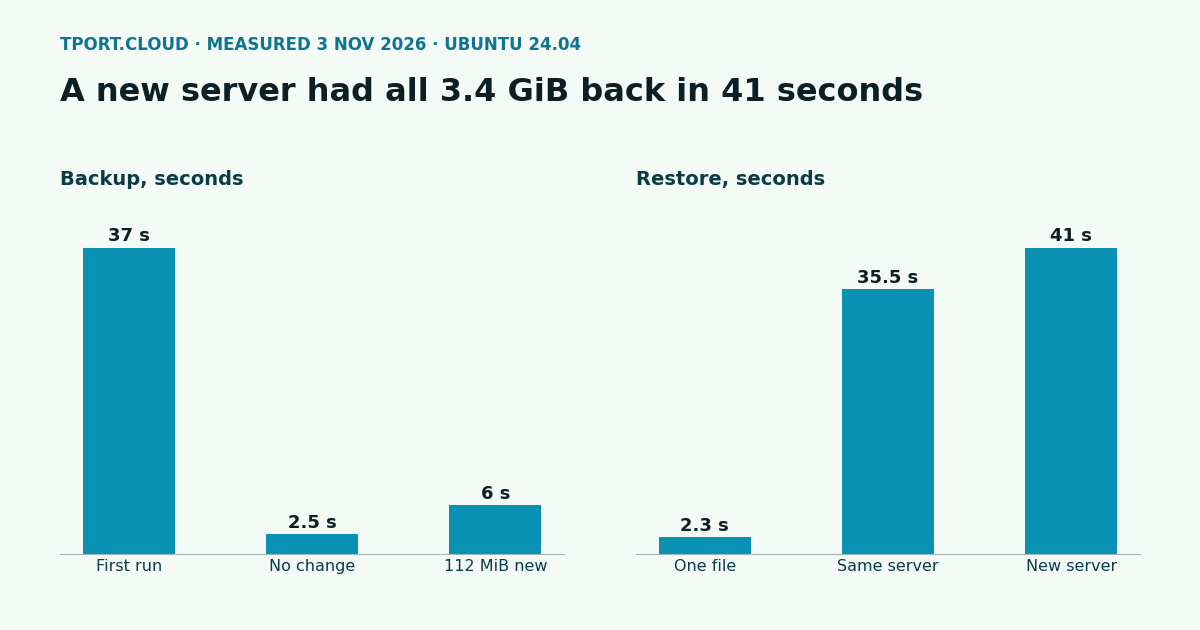
| First backup, 3.34 GiB, 86,639 files | 37 s | 229 MB | 1.48 GiB stored |
| Again, nothing changed | 2.5 s | 73 MB | 0 B added |
| After changing 200 files, 1% more dump, 2 new 50 MB files | 6 s | 199 MB | 102 MiB stored |
restic check, structure only | 1.7 s | 73 MB | No errors |
restic check --read-data, reads everything | 19.5 s | 155 MB | No errors |
forget --prune with the policy below | 5.4 s | 72 MB | 3 snapshots down to 2 |
Backing up a live database's files doesn't give you a usable copy. Dump it to a file first and back up the dump, as in our PostgreSQL guide.
Step 3: the encryption is real
Two quick checks. With the wrong password, restic stops: Fatal: wrong password or no key found. And a test email address we searched for was in the source dump, but in 0 of the 104 files in the bucket. Whoever runs your storage can't read your data.
Step 4: run it every day
Persistent=true runs a backup at the next boot if the server was off at 03:15. The retention above keeps at most 17 backups: 7 daily, 4 weekly and 6 monthly. A full run of backup, prune and check took 36 seconds on our data.
Step 5: hear about failures
A backup that fails silently is how people find out too late. OnFailure above starts this service when a run fails. Replace the address with your own alert hook:
To test it, we stopped the store and ran the service. It failed within 10 seconds, which was how often we checked, and the alert arrived once: backup failed on ubuntu. With the store back, the next run worked in 29 seconds with no cleanup.
This alert has a gap: a server that's off, or a timer that's been disabled, sends nothing. To catch that, have the backup ping an outside check service on success, one that warns you when the ping stops. We didn't test a particular service for this. Our monitoring guide covers the same blind spot for alerts in general.
Step 6: restore
| Restore | Time | Check |
|---|---|---|
| One 50 MB file | 2.3 s | cmp says identical |
| Everything, same server | 35.5 s | diff -r says identical (the diff took 74 s) |
| Everything, brand new server | 41 s, plus 11 s to install restic | All 86,641 SHA-256 checksums match |
One file:
A new server, with restic.env and restic.password copied back to /etc/ and chmod 600:
Restoring to / puts files back in their original paths and overwrites what's there, so use a temporary folder on a server that's still in use. Put a restore on your calendar every few months too: if the steps have gone stale, that's the day to find out.
What a slower link does to these times
Our store was next door, so these figures show restic's own speed. Over the internet, the data transfer becomes the slow part. Our bucket held 1.6 GB, so a restore needs that much downloaded. This is arithmetic, not a measurement: about 2 minutes at 100 Mbit/s, and about 13 seconds at 1 Gbit/s, plus restic's own work. Later backups stay quick on any link, since only changes get sent. Time your first restore on your real store.
One risk to think about
This setup keeps a key that can delete backups on the server, because pruning needs that. Anyone who takes over the server can wipe them too. If that worries you, look at object lock or versioning at your provider, or restic's append-only rest-server with pruning run from another machine. We didn't test those here.
Which of our servers can run this
All of them. On a 2 vCPU, 4 GB server under $20, restic and the timer worked, including the Nice and IOSchedulingClass lines. That test backed up to a local folder rather than a bucket, since it only checked what these servers allow. Backups go outward, so the limit on inbound ports under $20 doesn't matter. Peak memory of 229 MB fits every plan, though a much larger data set will use more.
Sources
Our own runs on Ubuntu 24.04, 3 November 2026, under QEMU/KVM with 2 vCPU, 4 GB and disk capped at 3,000 IOPS and 150 MB/s. restic 0.16.4 to a versitygw 1.10.0 S3 gateway on a second server over a 1.27 Gbit/s link (measured with iperf3), plain HTTP as it was a private lab network; use HTTPS on real stores. We tested the small server limits on 3 November too. Docs: restic: preparing a repository, restic: removing snapshots, systemd.timer.
Order a server and set this up before you have anything to lose.
See the servers